
Agent sprawl is a growing collection of agents that nobody can reliably account for, maintain or retire. Control it by assigning an owner and purpose to each agent, tracking the tools and skills it uses, reviewing duplicate or unused deployments, and testing what happens when access is removed. Buying a catalog is one part of that process.
Microsoft's agent-risk guidance identifies unmanaged or over-permissioned agents as a sprawl risk. Its recommendations include inventory, ownership and lifecycle governance. The practical question for a platform team is how to turn those principles into a small, maintained operating record.
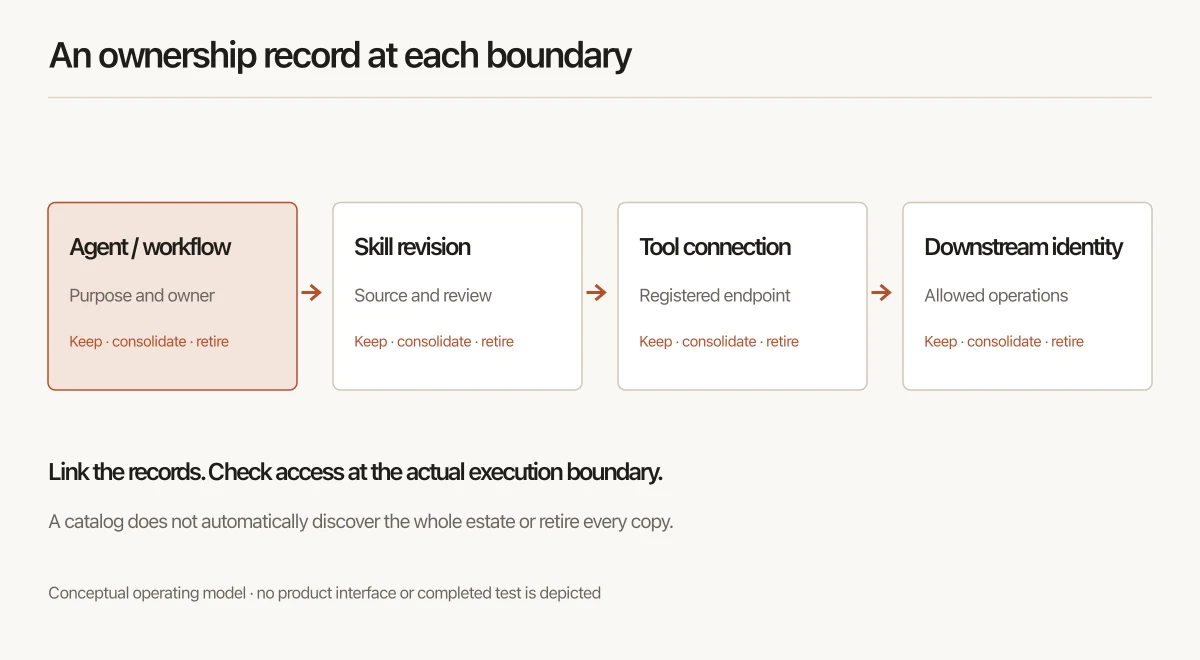
Start with one workflow, not an estate-wide count
Take a workflow such as an agent that prepares a weekly support summary. Record where it runs, who uses it and which systems it can reach. Follow those dependencies before widening the inventory.
A count alone cannot tell you whether ten agents are justified. Two agents that look similar may serve different data boundaries. One agent used by every department may have too many permissions. The review needs enough context to make that distinction.
IBM's agent-sprawl explainer distinguishes sprawl from shadow AI: even sanctioned agents can become fragmented or redundant. Finding unapproved tools is a related task; deciding what to keep and maintain also applies to the tools you already approved.
Keep agents, skills and tool connections separate
One row per agent is a useful starting point. It becomes misleading if a downloaded skill, an MCP server and the agent that uses them are treated as the same object.
| Record | What it represents | Question the owner must answer |
|---|---|---|
| Agent or workflow | The configured system doing a job | Who is accountable for its result and continued use? |
| Skill package and revision | Reusable instructions or supporting files | Which version was reviewed, and who receives updates? |
| MCP server or other tool connection | A route to capabilities outside the model | Who can call it, and through which client or gateway? |
| Downstream identity | The account or credentials used against a business system | Which operations and records can it reach? |
Link these records. A skill package is not a credential, and removing it does not necessarily remove the agent's other ways of reaching the same service.
For the architecture behind the catalog, see the existing agent-registry guide. The operating process below adds a decision about whether each recorded deployment should continue to exist. See agent registry vs agent gateway for the distinction between keeping a catalog and enforcing an invocation.
Use an ownership record that leads to an action
The following is a proposed review worksheet, not a claim that a particular product collects every field automatically.
| Field | Useful evidence | Action when it is missing |
|---|---|---|
| Business purpose | Named workflow and intended users | Ask the sponsoring team to confirm the need |
| Accountable owner | Current person and responsible team | Assign an owner before expanding access |
| Approved revision | Source location, version and review record | Hold new rollout while the revision is checked |
| Execution paths | Clients, scheduled jobs and gateways actually used | Map the paths before claiming a restriction is effective |
| Data and tool access | Effective identities and permissions | Check high-impact access first |
| Recent use and outcome | Activity evidence plus an owner-confirmed purpose | Investigate low use; do not retire on a guessed threshold |
| Review or expiry date | Agreed next decision date | Schedule a review with an accountable owner |
| Keep, consolidate or retire | Decision and reason | Leave the item open until the decision is made |
Do not let a populated spreadsheet substitute for checking the running configuration. Record the source and date of each important observation so the next reviewer can distinguish evidence from an owner's recollection.
Decide what to keep, consolidate and retire
Use three decisions rather than labeling every duplicate-looking agent a problem:
- Keep: its purpose, owner and access remain appropriate. Record the next review date.
- Consolidate: another maintained deployment can meet the requirement without breaking a data boundary or useful behavior. Test the replacement before switching users.
- Retire: its owner confirms it is no longer required. Remove its execution and access paths, then check for continuing activity.
For the support-summary example, two teams might share a maintained summary skill while retaining different identities and data permissions. That can reduce duplicate maintenance without merging access to their tickets.
Avoid a universal inactivity rule. A monthly reporting workflow will look idle during much of the month. Use the workflow's expected schedule and the owner's confirmation when making the decision.
Test retirement at each boundary
Write the expected outcome before making a controlled test change. If a resource is withdrawn, can an excluded user still discover it, download it or invoke it directly? Does a scheduled job continue under a shared account? Does a local copy remain?
Jarvis Registry's MCP access walkthrough separates application-role capabilities from access to a particular server. Both are required. The same guide explains why a server-wide disabled-tool list and the transparent proxy are different control paths; a successful test in one path is not evidence for every client configuration.
For private packages, the skill-lifecycle walkthrough distinguishes Registry access, CLI synchronization and client loading. Removing access is not remote deletion of every downloaded copy. Use those boundaries to write an acceptance record for your deployment, rather than assuming that a catalog removal completes offboarding.
This is a possible fit for Jarvis when the problem includes a shared private catalog, controlled distribution or access to registered tools. It is not a claim that Jarvis discovers every agent in the company or governs execution that bypasses its controls.
Measure whether the operating process is improving
Start with a baseline for the workflow you reviewed. Track unresolved owners, revisions awaiting review, unused deployments awaiting a decision and completed retirement checks. Keep the original counts and dates so a change in inventory scope does not look like an improvement. Use agent observability to identify which traces and tool-call records support that review.
An initial increase in recorded agents may mean discovery improved. A smaller inventory may mean useful consolidation—or incomplete coverage. Pair counts with evidence of ownership and access decisions before declaring success.
The useful outcome is straightforward: a team can name what runs, explain why it exists, update it safely and stop its access when it is no longer needed. Use that requirement to evaluate your existing Git process, native platform controls or a separate registry.
FAQ
What is agent sprawl?
Agent sprawl is the growth of agents and their dependencies without reliable ownership, oversight or retirement. An approved agent can still contribute to sprawl when its purpose overlaps another agent, its owner leaves or nobody checks whether it remains useful.
Is an agent registry enough to control sprawl?
A registry helps keep an inventory and ownership record. It does not automatically discover every agent or enforce every downstream permission. Pair the catalog with a registration process, controls on the execution paths your teams use, and explicit retirement checks.
Do we need a private skill registry if our skills are already in Git?
Git may be enough when one team can manage review, versions and distribution in its existing workflow. Evaluate a private registry when teams need a separate access-controlled catalog and managed delivery. Test approval, update and access-removal requirements before adding another system.
Does revoking a skill remove every downloaded copy?
No. Revocation can stop future access through the registry, and a successful managed sync can reconcile a managed local directory. Independent copies and material already loaded into an AI client need separate handling. Revoke related service credentials or tool permissions at their own control points.