
The Problem
Every organization is drowning in documents. Contracts stacked in SharePoint folders. Invoices scanned and forgotten. Application forms processed by hand. Equipment photos that carry critical information no system can read. The volume isn't the problem — the inaccessibility is.
Traditional OCR tools made a promise they couldn't keep. Yes, they could digitize a page — but digitizing text and understanding it are two entirely different things. The gap shows up in how the cloud vendors describe their own services now: one draws an explicit line between detecting text and analyzing documents into forms, tables and answers to targeted queries, with separate APIs for expenses, identity documents and lending packages [1]; the other positions its service as "a machine-learning based OCR and intelligent document processing service to automate extraction of key data from forms and documents," layering key-value pairs and document structure on top of raw Read [2]. A scanned invoice sitting in a folder is no more useful than a paper one in a filing cabinet if no one can query it, cross-reference it, or act on it in real time. Organizations end up with digital clutter instead of digital intelligence.
The downstream cost is real: knowledge workers spend hours hunting for information that should take seconds to find. Decisions get delayed. Errors slip through manual review. And the institutional knowledge locked inside years of unstructured documents? It stays locked — depreciating quietly while your team works around it.
The Solution
Intelligent Document Processing (IDP) is a category of AI that goes far beyond scanning and storing. It combines optical character recognition, large language models, and multimodal AI to transform any document — typed, handwritten, or visual — into structured, searchable, queryable knowledge.
Here's how it works at a high level:
File Search & Vectorization — Documents from across your storage ecosystem (cloud drives, SharePoint, S3, etc.) are automatically ingested and converted into vector embeddings. This makes them semantically searchable, not just keyword-searchable. You can ask a natural-language question and get back a cited, accurate answer drawn from across your entire document library — citation is the point, and it is the specific gap the original retrieval-augmented generation work set out to close, noting that "providing provenance for their decisions and updating their world knowledge remain open research problems" for parametric models [3]. In practice the retrieval layer is a set of tunable decisions rather than a single switch: chunk count, semantic versus hybrid search, metadata filters, reranking and query decomposition are each configured separately [4].
OCR with Intelligence — Rather than simply extracting text, modern IDP layers AI reasoning on top of OCR output. Handwritten notes, mixed-format forms, and messy scans are parsed with contextual understanding — not just character recognition. Handwriting is now a documented first-class capability rather than a caveat on both major clouds [1][2]. The system understands what the content means, not just what it says. Healthcare revenue cycle is the daily proof: when the structured eligibility rail doesn't carry the answer, the fax, the scanned EOB, and the payer letter usually do — and they only become usable once parsed this way.
Multimodal Understanding — This is where IDP becomes genuinely transformative. Images, photos, and diagrams are no longer opaque to AI. A photo of industrial equipment, a medical image, or a product visual can be analyzed, described, and made searchable — turning visual content into structured knowledge for the first time. The retrieval research points the same way: combining visual and textual representations of an item improves either purchase recall or relevance accuracy over a text-only semantic retrieval model [10].

ROI & Business Value
| Outcome | What It Looks Like in Practice |
|---|---|
| Faster information retrieval | Staff ask questions in plain language and receive cited answers in seconds instead of spending hours searching |
| Reduced manual processing | Invoices, forms, and applications processed automatically without human review at each step |
| Broader knowledge coverage | Handwritten notes, scanned contracts, and images become part of your searchable knowledge base |
| Lower error rates | AI-extracted data is consistent and auditable, reducing the human errors common in manual entry |
| Immediate time-to-value | No lengthy data migration or tagging projects — ingestion and vectorization happen at connection |
| Scalability without added headcount | Processing capacity scales with document volume, not with team size |
Practical Implementation Guide
Getting IDP into production doesn't have to be a multi-quarter initiative. Here's a practical path forward:
Audit your unstructured data landscape. Identify your top three document-heavy workflows — the ones causing the most friction. Common candidates: contract review, invoice processing, employee records, compliance documentation.
Connect your existing storage sources. A well-designed IDP solution should integrate directly with where your documents already live — SharePoint, Google Drive, Dropbox, S3 — without requiring migration.
Enable auto-vectorization. Ensure that as documents are ingested, they are automatically converted into vector representations. This is what makes semantic search possible without manual tagging or indexing. Treat the vector store as part of the security surface, not just the search surface — vector and embedding weaknesses are their own entry on OWASP's 2025 risk list for LLM applications, alongside sensitive information disclosure [5].
Configure delegated permissions. Respect your existing access controls. AI search should surface only what each user is already authorized to see. Map your current permission structure before going live — and expect that map to be messier than the org chart, since even a single collaboration platform warns that custom site permissions are an advanced scenario "Most organizations don't need," with multiple permission levels on a group resolving to the union of their permissions [8]. The pattern to copy is permission-aware retrieval: Microsoft documents AI apps using existing controls so that tenant data "is never returned to the user or used by a large language model (LLM) if the user doesn't have access to that data," with encrypted content additionally requiring the EXTRACT usage right [9]. In regulated settings the same discipline is a legal obligation — HIPAA requires access control limiting systems "to allow access only to those persons or software programs that have been granted access rights" [7] and limiting disclosure to "the minimum necessary to accomplish the intended purpose" [6]. Retrieval-time metadata filters are the mechanism that enforces this at query time rather than after the fact [4].
Start with a high-ROI pilot. Pick one document type (e.g., invoices or contracts) and one target use case (e.g., "answer questions about contract terms"). Prove value quickly before expanding scope.
Expand to multimodal content. Once text-based documents are running, extend the pipeline to images and mixed-format files. This is where many organizations find the most untapped value.
Establish a feedback loop. Monitor query quality and answer accuracy. Use misses to improve ingestion settings, chunking strategies, and metadata tagging over time. Budget for turning the telemetry on deliberately: model invocation logging on a mainstream inference platform is disabled by default and only starts capturing request and response bodies once a CloudWatch Logs or S3 destination is configured [11]. Check where the documents themselves land too — AWS states that model providers have no access to the deployment accounts and so "don't have access to Amazon Bedrock logs or to customer prompts and completions" [12].
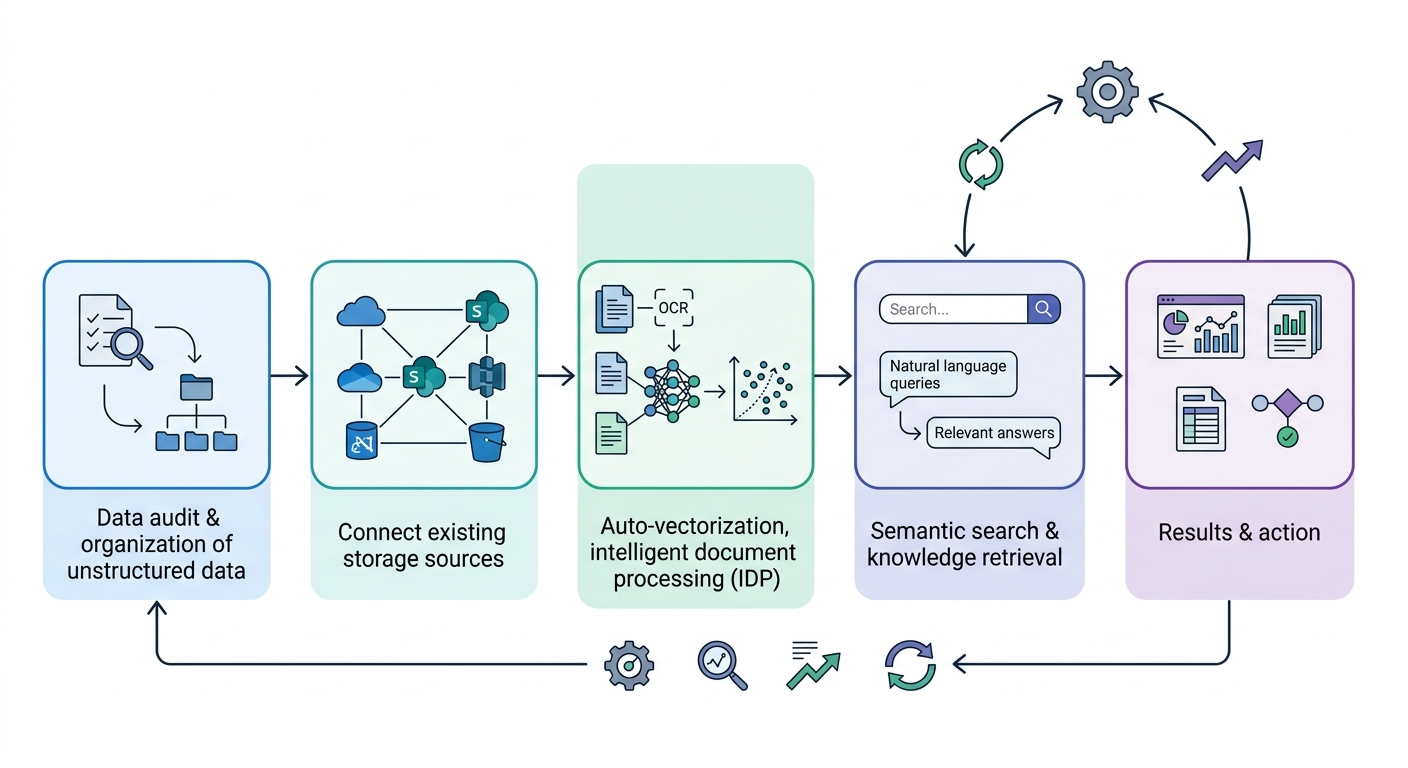
A step-by-step business process flow starting with a data audit, moving through connection and vectorization steps, and concluding with a feedback loop for continuous improvement.

The Hard Limits Your Pipeline Has to Fit Inside
Every IDP design meeting eventually reaches the same question — how big a document can this actually take? — and gets a shrug. It should not. Both major document services publish fixed limits, and several of them decide architecture rather than configuration: whether you need a splitter, a queue, or a different pricing tier.
Amazon Textract publishes these as set quotas, meaning a support ticket cannot raise them [13]:
| Limit | Value |
|---|---|
| Synchronous operations | JPEG, PNG, PDF and TIFF up to 10 MB in memory; PDF and TIFF limited to 1 page |
| Asynchronous operations | JPEG and PNG up to 10 MB; PDF and TIFF up to 500 MB and 3,000 pages |
| Image resolution | 10,000 pixels or fewer on every side |
| PDF page geometry | maximum 40 inches and 9,000 points high and wide; password-protected PDFs are not supported |
| Queries per page | 15 synchronous, 30 asynchronous |
| Minimum detectable text height | 15 pixels — roughly 8 point at 150 DPI |
| Languages | English, French, German, Italian, Portuguese, Spanish; handwriting recognition is English only |
| Adapter training set | 5–2,500 training and 5–1,000 test files, 10 MB each |
Azure AI Document Intelligence publishes its v4.0 quotas per pricing tier, with a free tier that is a demo rather than a pilot [14]:
| Quota | Free (F0) | Standard (S0) |
|---|---|---|
| Maximum document size | 4 MB | 500 MB |
| Maximum pages per analysis | 2 | 2,000 |
| Analyze transactions per second | 1 | 15 by default, adjustable |
| Get-operation transactions per second | 1 | 50 by default, adjustable |
| Maximum custom template models | 500 | 5,000 |
| Maximum custom neural models | 100 | 500 |
| Classifier training pages | 25,000 | 25,000 |
| Classifier document classes | 1,000 | 1,000 |
| Minimum samples per class | 5 | 5 |
| Neural and generative training set | 1 GB, up to 50,000 pages | 1 GB, up to 50,000 pages |
Four of these are architecture decisions in disguise.
The one-page synchronous ceiling. Textract's synchronous APIs accept a single PDF or TIFF page. Anything multi-page is an asynchronous job — which means a queue, a status poller, and a completion callback, not a request/response call in your web tier. Teams that prototype on single-page invoices and then meet a forty-page contract discover this the week before launch.
The page ceilings are the real capacity limit, not the byte ceilings. 3,000 pages on Textract and 2,000 on Azure Standard are what a long lease, a policy manual, or a loan file actually runs into. Build the splitter on day one and make it deterministic, because page boundaries are also citation boundaries.
Handwriting and language coverage is narrower than the pitch. Textract's handwriting recognition is English only, and its text detection covers six languages. If "handwritten notes become searchable" is load-bearing in your business case for a non-English corpus, verify it against the real document set before it becomes a commitment.
The free tier cannot tell you whether this works. Two pages per analysis and one transaction per second is enough to watch the API respond and nothing more. Assume the paid tier from the first week of a pilot.
One number to size the ingest queue against: 15 analyze transactions per second is the Azure Standard default, raisable by support request. Backfilling a document archive is throttling work rather than compute work, and it should be planned as a rate-limited drain rather than a batch job.
FAQ
What is intelligent document processing?
Intelligent Document Processing (IDP) combines optical character recognition, large language models, and multimodal AI to transform any document — typed, handwritten, or visual — into structured, searchable, queryable knowledge. It goes well past scanning and storing: documents are ingested from the storage systems where they already live, converted into vector embeddings, and made semantically searchable rather than only keyword-searchable.
How is IDP different from traditional OCR?
Traditional OCR digitizes a page; it does not understand it. IDP layers AI reasoning on top of the OCR output, so handwritten notes, mixed-format forms, and messy scans are parsed with contextual understanding rather than character recognition alone. The system reads what the content means, not just what it says — which is the difference between digital clutter and digital intelligence.
Do we have to migrate documents to a new repository first?
No. A well-designed IDP solution integrates directly with where documents already live — SharePoint, Google Drive, Dropbox, S3 — without requiring migration. Ingestion and vectorization happen at connection, so there is no lengthy data migration or manual tagging project standing between wiring up the source and getting the first cited answer back out of it.
Can AI search expose documents a user shouldn't see?
Not when delegated permissions are configured correctly. AI search should surface only what each user is already authorized to see, which means mapping the existing permission structure before going live rather than after. Permission propagation is one of the harder parts of building an IDP pipeline, and it belongs on the pre-launch checklist rather than the backlog.
What can multimodal understanding actually do?
It makes images, photos, and diagrams legible to the system for the first time. A photo of industrial equipment, a medical image, or a product visual can be analyzed, described, and made searchable, which turns visual content into structured knowledge instead of opaque files. Many organizations find their most untapped value sits in exactly this material.
Where should an IDP pilot start?
With one document type and one target use case — invoices or contracts, paired with a question like "answer questions about contract terms." Both are well-trodden enough that prebuilt extraction models ship for them out of the box [2]. Audit the top three document-heavy workflows first and pick the one causing the most friction. Prove value on that narrow scope before extending the pipeline to images and mixed-format files, where the next wave of value usually sits.
References
- Amazon Textract distinguishes text detection from document analysis: it detects "typed and handwritten text in a variety of documents, including financial reports, medical records, and tax forms," extracts "text, forms, and tables from documents with structured data" through the Document Analysis API, supports targeted extraction through the Queries feature, and adds AnalyzeExpense for invoices and receipts, AnalyzeID for driver's licenses and passports, and an Analyze Lending workflow that routes mortgage pages to the right operation — Amazon Web Services (2026): https://docs.aws.amazon.com/textract/latest/dg/what-is.html
- Microsoft describes Azure Document Intelligence as "a machine-learning based OCR and intelligent document processing service to automate extraction of key data from forms and documents," with Read extracting "printed and handwritten text," Layout extracting "text, tables, and document structure," General document extracting "text, structure, and key-value pairs," and prebuilt models for invoices, receipts, contracts, bank statements, checks, pay stubs, US tax forms, US mortgage forms, health insurance cards and identity documents — Microsoft (2026): https://learn.microsoft.com/en-us/azure/ai-services/document-intelligence/overview
- The paper that introduced retrieval-augmented generation identifies provenance as an open problem for parametric models — "providing provenance for their decisions and updating their world knowledge remain open research problems" — and proposes pairing pre-trained parametric memory with a dense vector index as non-parametric memory — Lewis, Perez, Piktus et al., NeurIPS (2020): https://arxiv.org/abs/2005.11401
- A managed retrieval layer exposes the number of source chunks returned, search type (default, hybrid or semantic), manual and implicit metadata filtering with equals/notEquals/greaterThan/in/notIn operators combinable through andAll and orAll groups, guardrails, reranking, query decomposition and custom prompt templates — the decisions that determine whether an IDP pipeline returns the right passage — Amazon Web Services (2026): https://docs.aws.amazon.com/bedrock/latest/userguide/kb-test-config.html
- The 2025 OWASP Top 10 for LLM Applications lists Sensitive Information Disclosure at LLM02 and Vector and Embedding Weaknesses at LLM08, alongside Prompt Injection, Improper Output Handling, Excessive Agency and Misinformation — OWASP GenAI Security Project (2025): https://genai.owasp.org/llm-top-10/
- HIPAA's minimum necessary standard requires that when using, disclosing or requesting protected health information, a covered entity or business associate "must make reasonable efforts to limit protected health information to the minimum necessary to accomplish the intended purpose of the use, disclosure, or request" — 45 CFR 164.502(b), via Cornell Legal Information Institute: https://www.law.cornell.edu/cfr/text/45/164.502
- The HIPAA Security Rule's technical safeguards require access control policies that "allow access only to those persons or software programs that have been granted access rights," audit controls recording and examining system activity, integrity protection, person-or-entity authentication, and transmission security — 45 CFR 164.312, via Cornell Legal Information Institute: https://www.law.cornell.edu/cfr/text/45/164.312
- Microsoft's SharePoint permissions guidance opens by stating that custom site permissions are advanced scenarios "Most organizations don't need," documents group-based permission levels, and notes that assigning multiple permission levels to a group yields the union of their permissions — the reason an inherited ACL map drifts — Microsoft (2026): https://learn.microsoft.com/en-us/sharepoint/customize-sharepoint-site-permissions
- Microsoft documents permission-aware AI retrieval, stating that supported AI apps use existing controls "to ensure that data stored in your tenant is never returned to the user or used by a large language model (LLM) if the user doesn't have access to that data," with encrypted content additionally requiring the EXTRACT usage right before an AI app will return it — Microsoft (2026): https://learn.microsoft.com/en-us/purview/ai-microsoft-purview
- Research on multimodal semantic retrieval for product search finds that "a multimodal representation scheme for a product can show improvement either on purchase recall or relevance accuracy in semantic retrieval" relative to a text-only semantic retrieval model — Liu and Lopez Ramos (2025): https://arxiv.org/abs/2501.07365
- Amazon Bedrock model invocation logging "is disabled by default"; once configured it delivers full request and response data plus metadata to CloudWatch Logs or Amazon S3, with each record carrying the caller's IAM/STS ARN, model ID, operation and token counts — Amazon Web Services (2026): https://docs.aws.amazon.com/bedrock/latest/userguide/model-invocation-logging.html
- Amazon Bedrock runs each provider's inference software inside a service-owned Model Deployment Account; because providers cannot access those accounts, "they don't have access to Amazon Bedrock logs or to customer prompts and completions" — Amazon Web Services (2026): https://docs.aws.amazon.com/bedrock/latest/userguide/data-protection.html
- Source of the Amazon Textract set quotas tabulated above — 10 MB and one page for synchronous PDF/TIFF, 500 MB and 3,000 pages asynchronous, a 10,000-pixel image ceiling, 40 inches / 9,000 points PDF geometry, 15 and 30 queries per page, a 15-pixel minimum text height, six detection languages with English-only handwriting, and the 5–2,500 / 5–1,000 adapter dataset bounds. Documented as set quotas that cannot be changed — Amazon Web Services (2026): https://docs.aws.amazon.com/textract/latest/dg/limits-document.html
- Source of the Azure AI Document Intelligence v4.0 tier limits tabulated above — 4 MB / 500 MB document size, 2 / 2,000 pages per analysis, 1 / 15 analyze TPS and 1 / 50 get-operation TPS, 500 / 5,000 template models, 100 / 500 neural models, 25,000 classifier training pages, 1,000 document classes, 5 minimum samples per class, and the 1 GB / 50,000-page neural training set — Microsoft (page dated April 2026): https://learn.microsoft.com/en-us/azure/ai-services/document-intelligence/service-limits