
Ever see this with your MCP gateway?
- "Why am I logging in again?"
- "My Copilot action failed even though it worked a minute ago."
- "After consent, I lost my place and had to start over."
If you're seeing a few isolated bugs that look slightly different from each other to you but are very annoying to your users, then you're probably looking at a gateway usability pattern for your engineering team. In other words, these bugs aren't just a nuisance to your users. They're also wasting a lot of time and causing a lot of frustration for your engineering team.
The same problems manifest themselves quickly in engineering channels as well.
- "We cannot reproduce the auth failure because the token already rotated."
- "One provider refreshes fine, another fails with a different error contract."
- "Support tickets spiked right after a small redirect or scope change."
- "On-call is firefighting 401 loops with almost no auth lifecycle telemetry."
What initially looks like user friction to business teams quickly translates into reliability work, support load, and incident noise for platform teams.
These are the everyday problems faced by people building MCP gateways. This guide maps out each of them as concrete elements of your implementation, fully aligned with the latest standards for OAuth 2.1, PKCE, RFC 8707, and more, including the use of RFC 8707 resource indicators and RFC 9728 protected resource metadata discovery.
1) Where MCP Gateway Auth Hurts in Real Operations
Pain points of MCP auth for developers and end users in agent workflows.
- Users get prompted too often, even when a valid session should continue.
- Long-running tasks fail because access tokens expire at the wrong moment.
- Re-auth drops users out of the original context, so they restart work manually.
For the engineers that run the gateways these events will turn into operational incidents that will happen from time to time.
- Intermittent auth bugs that are hard to replay: Token state, provider state, and client state all drift very quickly. Issues therefore vanish before anyone even gets to start debugging them.
- Provider-specific edge cases: The lifetimes with which to refresh, the error payloads and the way to retry them all vary greatly between SaaS providers creating very brittle logic paths.
- Context-loss defects: Users are able to successfully re-authenticate but are not able to return to the exact tool invocation that they had previously been working on, leading to duplicated work and decreased trust.
- Alert fatigue and noisy incident response: Repeating 401/403 errors without telemetry into the full auth lifecycle of events to root cause.
- Change-risk amplification: Even small changes to config around things like redirect URI, scopes, consent policy can affect many MCP servers and regress them.
With gateway-centered architecture, application-specific issues become platform issues. If the gateway fails to preserve authentication continuity, every MCP server integration suffers the same issues.
Auth UX is just another area of Platform Reliability Engineering that should have SLOs around prompt rate, refresh rate, and resume rate.
2) Practical Elements of a User-Friendly MCP Gateway
Before we dive into the implementation details of an MCP gateway, let's outline the core elements of such a gateway that are required to make it work in production.
- Contextual auth elicitation: Don't prompt the user on every auth exception. Prompt only when required.
- Silent token lifecycle management: Refresh before expiry. Fail over gracefully when refresh is invalid.
- Fast re-entry UX: Deep-link users back to the same Copilot workflow that they had been working in when consent is given.
- Resource-safe token boundaries: Enforce resource-aware token usage to prevent replay of credentials across all MCP servers.
- Metadata-driven interoperability: Use protected resource metadata discovery to have clients and gateways agree on authentication expectations.
- Operational visibility: Emit auth lifecycle telemetry for teams to quickly diagnose failures.
Practical takeaway: Users will feel a lack immediately if one of the six elements is missing.
3) What Auth Elicitation Should Mean in Production
Auth elicitation = prompting for user input only when policy/protocol requires it. Otherwise, it is prompt fatigue.
Use this decision model:
- First consent for a provider or MCP server: elicit.
- Scope escalation (new privilege requested): elicit.
- Refresh token invalid or revoked: elicit.
- Session still valid with refresh possible: do not elicit.
Do:
- Keep prompts contextual: explain why consent is needed now.
- Preserve original task state before redirecting for auth.
- Return users to the exact action after auth completes.
Do not:
- Trigger full re-auth on every 401 without checking refresh path first.
- Ask for broader scopes "just in case."
- Lose user context across redirect boundaries.
Collapsed into one grid, the decision model and the do/do-not rules give you the whole elicitation policy on a single screen:
| Condition | Elicit? | Correct behavior | Anti-pattern |
|---|---|---|---|
| First consent for a provider or MCP server | Yes | Explain in the prompt why consent is needed now, and preserve the original task state before redirecting | Redirecting without capturing the task the user was in the middle of |
| Scope escalation — a new privilege is requested | Yes | Request only the scope the current action actually needs | Asking for broader scopes "just in case" |
| Refresh token invalid or revoked | Yes | Move to a clear re-consent flow with an actionable message | Blind retry against a token that will never succeed |
| Session still valid with refresh possible | No | Refresh silently under single-flight, then return the user to the exact action | Full re-auth on every 401 without checking the refresh path first |
Minimum Elicitation: Event-Driven, Not Business-As-Usual.

4) Token Refresh Is a UX Feature, Not Just Security Plumbing
By the time users start to notice refresh activity, the experience is likely already being impacted negatively. Your real goal is to enable continued, transparent and seamless experience activity, transitioning to safe and usable fallbacks when necessary.
Production defaults for refresh behavior
- Refresh-before-expiry window: renew token early (for example, when remaining lifetime is below a threshold) instead of waiting for hard expiry.
- Single-flight refresh: if multiple requests hit near-expiry tokens, allow only one refresh operation and fan out the result.
- Retry with bounded backoff: tolerate transient token endpoint errors without immediate user disruption.
- Revocation-aware fallback: if refresh is denied, move to a clear re-consent flow.
- Per-user, per-server isolation: never reuse one server's credential on another resource boundary.
What to log for operability
- Refresh attempts and outcomes (success, retry, revoked, failed).
- Time-to-expiry at refresh trigger.
- Number of concurrent callers deduplicated by single-flight logic.
- Re-consent rate by provider and MCP server.
Refresh quality impacts task completion rate directly in Autonomous and Assisted agent workflows.
5) Deep Links for Copilot Usability (VS Code as Example)
Deep links can also reduce drop-off after consent, as users are returned to the relevant tool context with the click of a link.
Recommended flow pattern
- User starts an MCP action from Copilot context.
- Gateway detects auth is required and issues consent URL.
- After consent, gateway redirects to a client-specific deep link with short-lived state.
- Client reopens the exact workflow context and resumes.
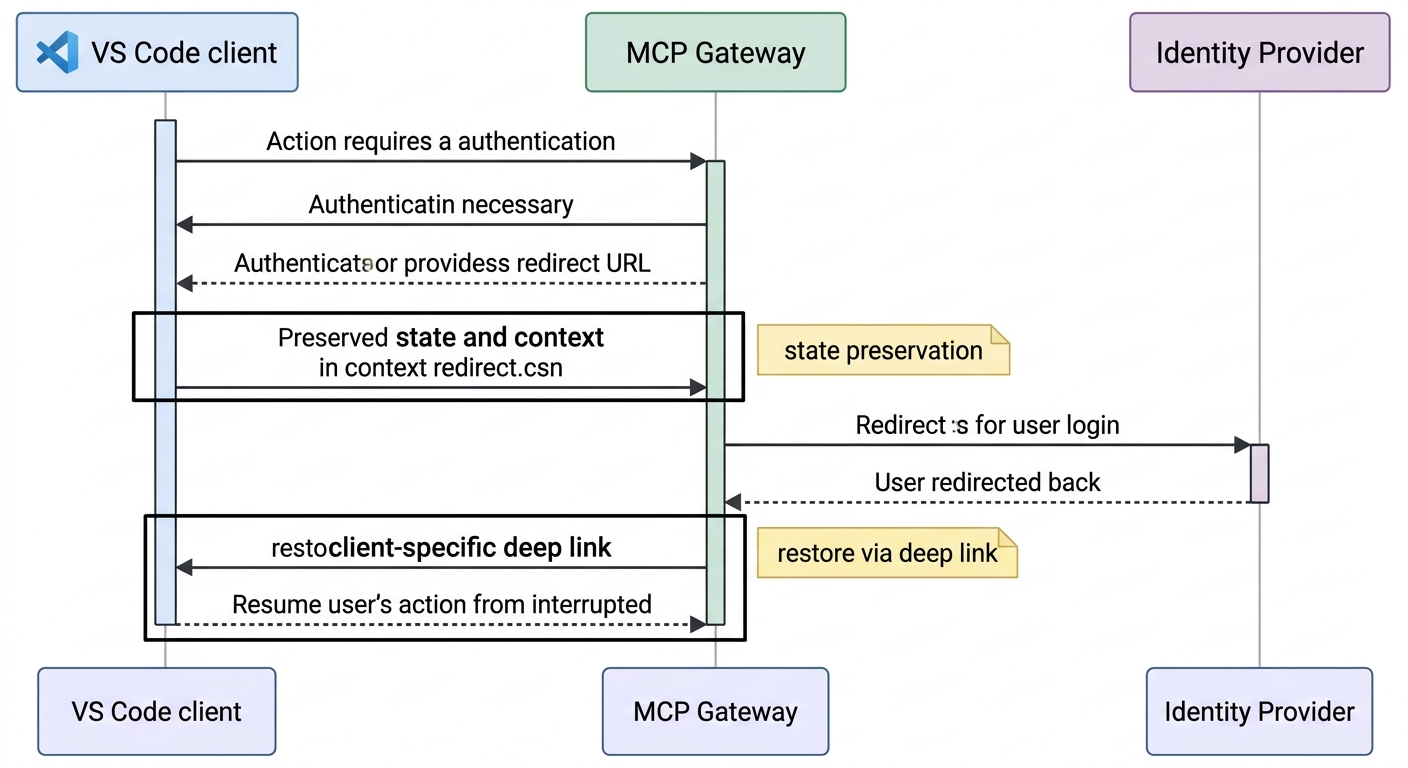
A sequence diagram showing the interaction between a VS Code client, the MCP Gateway, and an Identity Provider, specifically highlighting how state is preserved during an OAuth redirect and restored via a client-specific deep link.

Concrete link examples
Use HTTPS entry links of your gateway as the stable contract:
- VS Code/GitHub Copilot entry:
https://your-gateway.example.com/auth/start?client=vscode&provider=microsoft&return=resume - Microsoft Copilot web/app entry:
https://your-gateway.example.com/auth/start?client=ms-copilot&provider=microsoft&return=resume
Optional client return link (when client supports custom URI handling in your environment):
vscode://<your-handler>/mcp-auth-complete?state=<opaque-state>
Compatibility fallback:
- If a custom URI cannot be invoked (browser policy, tenant restrictions, client limitations), land on a "Resume in Client" page with explicit buttons and a copyable resume token.
One practical takeaway from this presentation is to make the gateway's deep link the source of truth, and then from there branch off to client-specific handlers where supported.
6) RFC Alignment Without Overcomplication
You don't need to give an RFC lecture in every design review, but you do need to make sure that someone can map out the behavior to the appropriate standards in a consistent fashion.
Lightweight standards map
- OAuth 2.1 direction + PKCE everywhere appropriate: Include PKCE as a hardening control in the authorization code flows.
- RFC 8707 resource indicators: Request and validate token intent as being resource-bound to prevent credentials minted for one resource from being replayed against other resources.
- RFC 9728 protected resource metadata: Metadata discovery can be used to synchronize clients and gateways on resource and authorization server expectations.
A concrete case where all three requirements land at once is gateway-mediated access to healthcare clearinghouse and payer APIs — client-credentials tokens that must stay resource-bound, scoped per tool, and audited per call. That pattern is worked through end-to-end in our eligibility-verification agent reference architecture.
If you'd like to read more of the author's work on the MCP gateway, see What Your Enterprise IdP Is Missing for Agentic AI, Agent Registry vs. Agent Gateway, and The Agent Registry Gaps No One Is Talking About. Those pieces go into more depth on how the mentioned RFCs interact in agent-driven workflows as well as typical gateway scenarios for effective enterprise AI governance and authentication.
Standards should be referenced where you check that you have implemented something correctly, and not in a separate document labeled "Compliance".
7) Top Failure Modes and How to Prevent Them
Failure 1: Repeated login prompts
Cause: refresh path not attempted before full re-auth. Fix: enforce refresh-first branch with clear fallback rules.
Failure 2: Refresh token race conditions
Cause: concurrent requests trigger duplicate refresh calls. Fix: single-flight refresh keyed by user and resource.
Failure 3: Expired-token retry loops
Cause: blind retry without state transition to re-consent. Fix: Cap retries and transition to elicitation w/ actionable message.
Failure 4: Broken return experience after consent
Cause: redirect target loses original task context. Fix: signed resume state and deterministic return routing.
Failure 5: No usable audit trail
Cause: auth logs are unstructured or incomplete. Fix: Standardize the event taxonomy for consent, refresh, fallback and failure.
8) Production Recommendations: Open Source Plus Enterprise Support
For a very practical guide to how to run production auth instead of trying to figure out the innumerable ways that the edge cases of auth interact with each other, the open-source Jarvis Registry (which is one of the Jarvis patterns that we open-sourced) is a fantastic place to start.
- Repository: https://github.com/ascending-llc/jarvis-registry
What to take from it for MCP gateway production readiness:
- Resource-aware OAuth handling tied to gateway proxy paths.
- Metadata-first discovery patterns for protected resources.
- Clear ingress versus egress auth responsibility separation.
- Operational emphasis on refresh lifecycle and fallback behavior.
Start from the reference implementation and then adapt the policy knobs (scope policy, retry limits, tenant controls and observability depth) to your environment.
When you need enterprise scale and support
Open source is the right starting point for many teams. But for enterprise environments, it is not enough. They need additional features such as centralized governance, support for multiple teams, SLAs for production, and dedicated support for security and operations.
If your organization uses the enterprise offerings for MCP and agent gateway operations, see that information here.
- Jarvis Registry (enterprise registry and governance): https://ascendingdc.com/jarvis-ai/jarvis-registry/
- MCP Gateway (enterprise gateway for MCP server traffic): https://ascendingdc.com/jarvis-ai/mcp-gateway/
- Agent Gateway (enterprise gateway for agent-to-agent and agent runtime traffic): https://ascendingdc.com/jarvis-ai/agent-gateway/
Start with the open-source baseline to drive architecture clarity, and then move to an enterprise gateway and registry support when you need the operational guarantees, greater governance, and ability to have teams produce and run things off of it.
Conclusion: Make OAuth Feel Invisible to Users
The strongest MCP gateway auth systems are those that users don't even notice are there, as opposed to all the ones that have so many diagrams.
When auth elicitation is minimal, refresh is silent, and deep-link return is reliable, you get the outcomes that matter.
- fewer interruptions,
- higher task completion,
- and safer, more predictable OAuth operations at scale.
Frequently asked questions
What is auth elicitation in an MCP gateway?
Auth elicitation is prompting the user for consent only when policy or protocol requires it — first authorization for a server, a scope escalation, or a revoked refresh token. Prompting on every 401 is prompt fatigue, not elicitation.
How do I stop repeated login prompts in an MCP gateway?
Attempt the refresh path before any full re-authentication. Most repeated prompts come from treating a recoverable 401 as a fresh login: enforce a refresh-first branch with single-flight de-duplication and fall back to consent only when the refresh token is actually invalid.
What causes MCP gateway token refresh race conditions?
Concurrent requests hitting a near-expiry token each trigger their own refresh call. Fix it with single-flight refresh keyed by user and resource — allow one refresh to run and fan the result out to every waiting caller.
How do deep links improve MCP gateway auth UX?
After consent, the gateway redirects to a client-specific deep link carrying short-lived resume state, so the client reopens the exact tool invocation the user started. That removes the "I lost my place" drop-off that drags down task completion.
Which RFCs matter for MCP gateway authentication?
OAuth 2.1 with PKCE for authorization-code flows, RFC 8707 resource indicators to bind a token to the resource it was minted for, and RFC 9728 protected resource metadata so clients and the gateway agree on the authorization server and audience.
What is single-flight token refresh?
A concurrency control that lets only one token-refresh operation run at a time per user and resource, then shares the new token with every request that was waiting — preventing duplicate refreshes and the races they cause.
Citations and References
- Jarvis Registry open-source repository: https://github.com/ascending-llc/jarvis-registry
- Jarvis Registry (enterprise offering): https://ascendingdc.com/jarvis-ai/jarvis-registry/
- Jarvis MCP Gateway (enterprise offering): https://ascendingdc.com/jarvis-ai/mcp-gateway/
- Jarvis Agent Gateway (enterprise offering): https://ascendingdc.com/jarvis-ai/agent-gateway/
- OAuth 2.0 Authorization Framework (RFC 6749): https://www.rfc-editor.org/rfc/rfc6749
- PKCE for OAuth public clients (RFC 7636): https://www.rfc-editor.org/rfc/rfc7636
- OAuth 2.0 Resource Indicators (RFC 8707): https://www.rfc-editor.org/rfc/rfc8707
- OAuth 2.0 Protected Resource Metadata (RFC 9728): https://www.rfc-editor.org/rfc/rfc9728