
Prompt caching is a billing and latency feature that lets Claude reuse the computed state of a repeated prompt prefix instead of reprocessing it: cached tokens are read back at 0.1x the base input rate — a 90% discount — in exchange for a one-time write premium of 1.25x (5-minute TTL) or 2x (1-hour TTL). In the 10-turn agent loop we work through below, prompt caching turns $0.51 of input spend into $0.14.
Most caching explainers teach the feature with a chatbot and a big PDF. That is the least interesting case. An agent loop re-sends the same system prompt, the same MCP tool definitions, and a growing conversation prefix on every single turn — exactly the shape the cache was built for. Token accumulation in an agent loop is quadratic; cache reads at 0.1x flatten it to something close to linear.
This guide covers the mechanics most posts hand-wave — breakpoints, exact-prefix matching, TTL resets — the write-versus-read arithmetic on both platforms, and the failure modes that let a team believe it is caching while paying full price. Every number was checked against the Bedrock pricing page and the Anthropic docs in July 2026.
How Prompt Caching Actually Works
Three mechanics decide whether you save 70% or exactly nothing.
Exact-prefix matching
The cache key is derived from the exact bytes of your request, rendered in a fixed order: tools first, then system, then messages. A hit requires the prefix to be byte-identical to what was written. One changed character at position N invalidates everything after position N. No partial credit, no similarity matching.
The three sections chain. Because tools render first, changing a tool definition invalidates the system and messages caches behind it. Switching models does the same — caches are model-scoped. Almost every silent cache failure traces back to this ordering.
Breakpoints
You mark what to cache with explicit markers — cache_control: {"type": "ephemeral"} blocks on the Anthropic API and Bedrock's InvokeModel, cachePoint blocks in the Bedrock Converse API. A request carries up to 4. On each new request, the system also looks backward up to roughly 20 content blocks from a marker for the longest matching prefix it already holds.
Minimum cacheable size
Below a per-model minimum, nothing caches — silently. The request succeeds; you just paid full price. On Bedrock, Claude Opus 4.6, Opus 4.5, Sonnet 4.5, and Haiku 4.5 all require 4,096 tokens per checkpoint; Claude Sonnet 4.6 caches from 1,024. The Anthropic API publishes its own per-model list, and the two platforms do not always agree — check yours. The minimum is evaluated against tools, system, and messages combined, so a 2,000-token system prompt plus 2,500 tokens of tool schemas clears a 4,096 bar together.
TTL resets on every hit
A cache entry lives for its TTL — 5 minutes by default — and every successful read resets the clock. This one detail rewrites the economics for agents: a loop that fires a request at least every 5 minutes keeps its cache warm indefinitely, paying the write premium once and reading at 0.1x for the rest of the session.
The Pricing Math: Write Premium vs Read Discount
The multipliers are identical on both platforms. What differs per model is the base input rate they multiply — rates verified on the Bedrock pricing page, July 2026:
| Per 1M input tokens | Base input | Cache write, 5-min TTL (1.25x) | Cache write, 1-hr TTL (2x) | Cache read (0.1x) |
|---|---|---|---|---|
| Claude Opus 4.6 | $5.00 | $6.25 | $10.00 | $0.50 |
| Claude Sonnet 4.6 | $3.00 | $3.75 | $6.00 | $0.30 |
| Claude Haiku 4.5 | $1.00 | $1.25 | $2.00 | $0.10 |
Break-even after one read
With the 5-minute TTL, the write premium is 0.25x and each read saves 0.9x. One write plus one read costs 1.35x versus 2.0x uncached — caching pays for itself on the second request. With the 1-hour TTL the premium is a full 1.0x, so you need at least two reads inside the window to come out ahead (2.0x + 0.2x = 2.2x versus 3.0x uncached across the same three requests).
Agent loops clear both bars without trying. A 10-turn loop reads its prefix nine times.
The rate-limit bonus nobody prices in
Cache reads are not deducted against your rate limits on either platform. For a fleet bumping into input-tokens-per-minute ceilings, a high hit rate is a quota increase nobody had to file a ticket for.
Why Agent Loops Are the Perfect Cache Shape
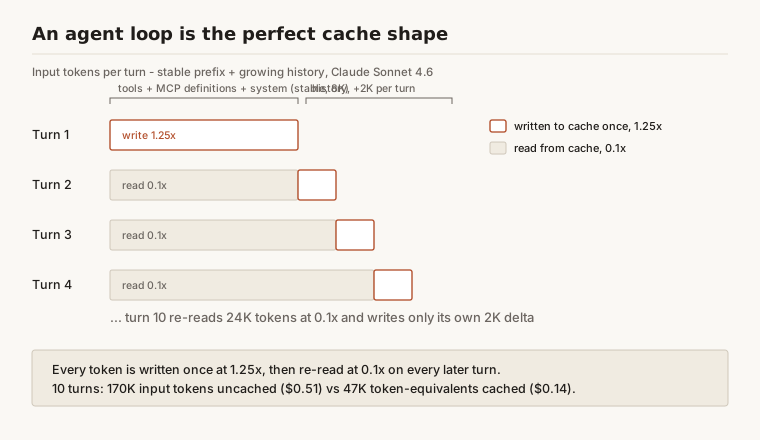
The 10-turn arithmetic
Take a mid-sized agent on Claude Sonnet 4.6: an 8,000-token stable prefix (system prompt plus MCP tool definitions) and roughly 2,000 tokens of new history per turn — the assistant's tool call plus the tool result. Turn one sends 8,000 tokens; turn ten sends 26,000, because the whole conversation rides along every time.
Uncached, ten turns process 170,000 input tokens: $0.51 at $3 per million. Cached, every unique token is written once at 1.25x (26,000 tokens, about $0.10) and the growing prefix is re-read at 0.1x (144,000 read tokens, about $0.04). Call it $0.14 per task — a 72% cut. Run 1,000 of those tasks a day and the input line drops from $510 to $141, roughly $11,000 a month, for an afternoon of engineering.
Longer loops save more
The savings rate climbs with loop length, because the quadratic re-send term keeps growing while the write cost stays linear. The same agent at 50 turns processes 2.85 million input tokens uncached ($8.55); cached, about $1.22 — an 86% cut, quadratic flattened to near-linear. Numbers like these are why caching sits at the top of any serious Bedrock cost model for agentic workloads.
Output tokens are untouched — but agent workloads are input-heavy, and the input side is what the cache eats.
What to Cache First: System Prompts and MCP Tool Definitions
Tool definitions render at position 0
If your agent speaks MCP, its tool surface is probably bigger than you think. A single MCP server commonly exposes 15 to 40 tools, and each JSON schema runs 100 to 700 tokens once you count descriptions, parameter docs, and enums. Three connected servers can put over 10,000 tokens of tool definitions ahead of your system prompt — re-sent, and re-billed, on every turn of every session. Tools render first, which makes them the highest-leverage thing to cache: a breakpoint after the tool block covers the most expensive and most stable stretch of the prefix.
Two breakpoints cover most agents
The pattern that handles 90% of agent loops: one breakpoint after tools plus system, written once per deploy and read by every session; one riding the last content block of the newest turn, so each turn reads the previous turn's cache and writes only its own delta. That is two of your four markers — keep the spares for a large retrieved document or a per-session context block.
Keep the tool list deterministic
The cache does not care why bytes changed. Tools serialized from an unordered map, schemas regenerated with keys in a different order, a gateway that appends servers in connection order — all produce prefixes that are semantically identical and byte-different, the worst combination. Sort tools by name, serialize with sorted keys, and pin the ordering at your MCP gateway so every agent behind it inherits the fix. Slimming the schemas themselves is a separate lever — we covered it in token optimization for MCP tools.
5-Minute vs 1-Hour TTL: Decide by Loop Cadence
The cadence rule
The decision is one question: how long is the longest gap between requests that share the prefix? Under 5 minutes, the default TTL wins — every hit resets the clock, so a loop calling a tool every 20 seconds never lets the cache expire. Gaps between 5 minutes and an hour are where the 1-hour TTL earns its 2x write: human approval steps, agents waiting on slow external jobs, support sessions where the user wanders off. Past an hour, stop — you would be paying premiums to warm a cache nothing will read.
The 1-hour TTL on Bedrock
The 1-hour TTL went GA on Amazon Bedrock on January 26, 2026, for Claude Sonnet 4.5, Claude Haiku 4.5, and Claude Opus 4.5, in all commercial and GovCloud regions where those models run. One caveat from our July 2026 check: the Bedrock docs still list the 4.6-generation Claude models at 5 minutes only, so verify the model table before you design around the longer window. On the Anthropic API the 1-hour option is available broadly.
The syntax is one field. Converse API: add "ttl": "1h" to the cachePoint object. InvokeModel and the Anthropic API: add "ttl": "1h" to cache_control. You can mix TTLs in one request with one ordering constraint — 1-hour entries must appear before 5-minute entries.
Failure Modes: Paying Full Price While Believing You Cache
The tool-ordering war story
We reviewed an agent platform last year whose team was confident caching was on — the markers were in the code. cache_read_input_tokens had been zero for six weeks. The cause took an afternoon to find: their MCP server assembled its tool list from a hash map, so tool order shuffled between process restarts, and they deployed every few days. Tools render at position 0. Every shuffle was a full cache rebuild.
The fix was one line — sort tools by name before serializing. Input spend on that workload fell roughly 60% the next week with zero prompt or model changes. Nobody had noticed, because the bill looked normal. There was no baseline for what it should have been.
Timestamps and dynamic system prompts
The same failure wears other clothes. Current date: {now} interpolated into the system prompt gives you a new prefix every request. A session ID in the system prompt means no cross-session sharing. JSON serialized without sorted keys shuffles bytes at random. Feature-flagged system prompt sections turn every flag combination into its own cold cache. The rule is short: anything volatile goes after the last breakpoint, or it goes away.
Know the hierarchy before you panic
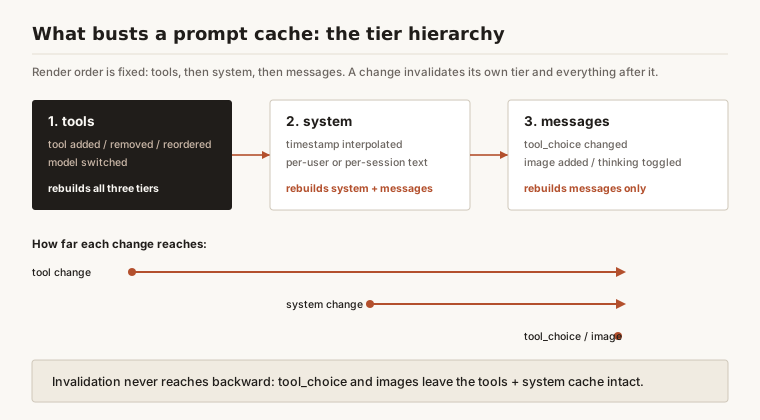
Not everything invalidates everything. Changing tool_choice, adding an image, or toggling thinking busts only the messages tier — the tools and system cache survives. Changing a tool definition or switching models rebuilds all three. Knowing which tier a change touches tells you whether a miss is expected behavior or a bug worth an afternoon.
How to Roll Out Prompt Caching in an Agent Loop: Five Steps
- Freeze the prefix. Audit the system prompt and tool list for anything dynamic — timestamps, user names, session IDs, feature flags. Move each one into a later message or delete it.
- Order content by stability. Tools and system first, conversation history next, per-turn volatile content last. The renderer enforces tools-system-messages; your job is keeping volatile bits out of the stable sections.
- Place breakpoints at the stability boundaries. One after tools plus system, one riding the newest turn. Confirm the stable block clears the model's minimum checkpoint size, or it will silently not cache.
- Pick the TTL by cadence. Loops faster than every 5 minutes take the default. Gaps of 5 to 60 minutes take
"ttl": "1h"— after confirming your model supports it on your platform. - Instrument the hit rate. Every response reports
cache_read_input_tokensandcache_creation_input_tokens(Bedrock Converse:cacheReadInputTokens/cacheWriteInputTokens); total input is the sum of uncached, read, and written tokens. Chart reads-to-total per agent and alert at zero — the alert the team above lacked for six weeks. Cache hit rate is a first-class LLM observability metric, not a finance report.
Where Prompt Caching Sits Among the Cost Levers
Caching is one of three levers that reliably move a Claude bill, and they compose.
| Lever | Headline discount | The trade | Combines with caching? |
|---|---|---|---|
| Prompt caching | 90% off repeated input tokens | Engineering discipline on prefixes | — |
| Batch inference | 50% off input and output | Asynchronous, up to 24 hours | Anthropic API: yes, best-effort. Bedrock: no |
| Model routing | 3-5x on tasks routed down | Evaluation work per task class | Yes — fully independent |
The batch row deserves its footnote. On the Anthropic API, caching works inside the Message Batches API on a best-effort basis — use identical cache_control blocks across requests and the 1-hour TTL, since concurrent processing makes 5-minute hits unreliable. On Bedrock, batch inference does not support prompt caching at all, so each workload picks the guaranteed 50% or the probable 90%-on-input, not both.
Routing has its own math — we work it through in cost per task with model routing and the Haiku vs Sonnet comparison. Above all three sits the pricing layer itself: volume commitments and private offers that lower the rates every multiplier applies to. Caching cuts the tokens you bill at list price; the discount layer cuts the rate. They stack — the Bedrock pricing guide covers that layer end to end.
Frequently Asked Questions
What is prompt caching?
Prompt caching lets Claude store the computed state of a prompt prefix — tool definitions, system prompt, conversation history — and reuse it across requests instead of reprocessing the same tokens. Cached tokens bill at 0.1x the base input rate, in exchange for a one-time write premium of 1.25x (5-minute TTL) or 2x (1-hour TTL). It works on both the Anthropic API and Amazon Bedrock via cache_control or cachePoint markers.
How much does prompt caching save on agent workloads?
It scales with how much of each request is repeated prefix, which in agent loops is nearly all of it. Our worked example — an 8K stable prefix and 2K of new history per turn on Claude Sonnet 4.6 — saves 72% of input spend over 10 turns ($0.51 down to $0.14) and 86% over 50 turns. Short-prompt chatbot workloads save far less.
When should I use the 1-hour TTL instead of the 5-minute default?
When the gap between requests sharing a prefix is longer than 5 minutes but under an hour — human approval steps, slow external tools, users who wander off mid-session. The 1-hour write costs 2x instead of 1.25x, so it needs at least two reads to beat not caching. Fast loops never need it, because every hit resets the 5-minute clock; and as of July 2026, Bedrock lists 1-hour support for Claude Sonnet 4.5, Haiku 4.5, and Opus 4.5.
Does prompt caching work with batch inference?
On the Anthropic API, yes — the Message Batches API supports caching best-effort, and Anthropic recommends the 1-hour TTL for batches with shared context because concurrent processing makes 5-minute hits unreliable. On Amazon Bedrock, no — prompt caching only works with on-demand inference, so a Bedrock workload chooses between the batch discount and the cache discount per job.
Why is my cache hit rate zero?
A silent invalidator is almost always the cause: a prefix below the model's minimum checkpoint size, a timestamp or UUID early in the prompt, tool lists serialized in nondeterministic order, or a model switch. Diff the rendered bytes of two consecutive requests and the culprit usually falls out in minutes. Zero writes means you never cached; writes without reads means you cache and then invalidate.
Is prompt caching the same on Bedrock and the Anthropic API?
The multipliers are identical — 1.25x and 2x writes, 0.1x reads — and so is the prefix model. The differences are operational: per-model minimum checkpoint sizes differ between platforms, Bedrock's 1-hour TTL covers a narrower model list, Bedrock batch inference excludes caching while Anthropic batches allow it, and Bedrock's Converse API uses cachePoint blocks where the Anthropic API uses cache_control.
References
- Amazon Bedrock documentation — Prompt caching for faster model inference. https://docs.aws.amazon.com/bedrock/latest/userguide/prompt-caching.html
- AWS What's New — Amazon Bedrock now supports 1-hour duration for prompt caching (January 26, 2026). https://aws.amazon.com/about-aws/whats-new/2026/01/amazon-bedrock-one-hour-duration-prompt-caching/
- Anthropic — Prompt caching documentation. https://platform.claude.com/docs/en/build-with-claude/prompt-caching
- Amazon Bedrock pricing. https://aws.amazon.com/bedrock/pricing/
- Anthropic — Batch processing documentation, including prompt caching within batches. https://platform.claude.com/docs/en/build-with-claude/batch-processing
- AWS Machine Learning Blog — Effectively use prompt caching on Amazon Bedrock. https://aws.amazon.com/blogs/machine-learning/effectively-use-prompt-caching-on-amazon-bedrock/