
Choose Claude Team when its controls and per-member usage allowances meet your requirements. Evaluate Enterprise when you need its additional provisioning, audit or retention controls, a larger deployment, or its purchasing arrangements. Both current Team seat types include Claude Code and SSO. Compare the complete usage bill and the agreement you actually have—not the seat price alone.
Plan details last verified: October 29, 2026. Prices below are published US-dollar list prices before tax. Annual prices are monthly equivalents of an annual commitment. Existing and specialized Enterprise contracts can follow different terms.
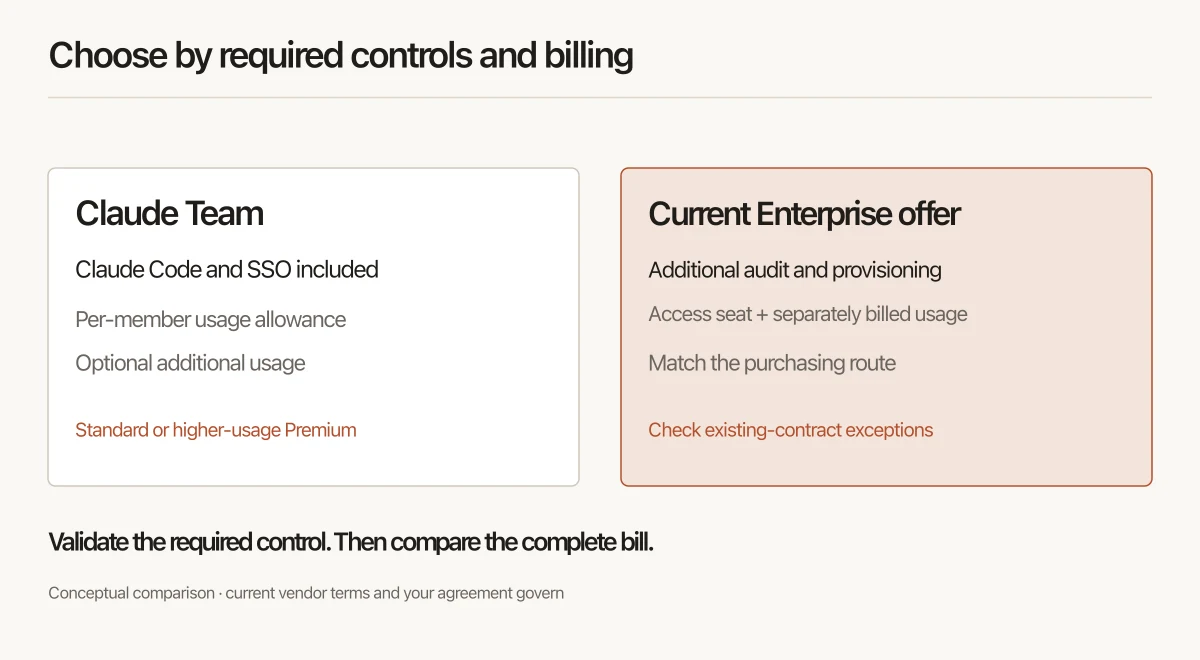
The current plan comparison
Anthropic's Team plan help, Enterprise plan help and pricing page establish the starting point:
| Decision | Team Standard | Team Premium | Current usage-based Enterprise offer |
|---|---|---|---|
| Published US seat price | $20/month equivalent on annual billing; $25 monthly | $100/month equivalent on annual billing; $125 monthly | $20/user/month, billed annually, plus usage |
| Published user range or minimum | 2–150 | 2–150; mix with Standard seats | 20-seat self-serve minimum; 50-seat sales-assisted minimum |
| Claude and Claude Code | Included | Included, with more usage | Included in the current unified seat |
| Included product usage | Per-member allowance, subject to limits | Larger per-member allowance, subject to limits | Seat fee covers access; usage is billed separately at API rates |
| SSO and team administration | Included | Included | Included, with additional Enterprise controls |
| SCIM, audit logs, Compliance API and custom retention | Not listed as Team features in the current plan comparison | Not listed as Team features in the current plan comparison | Documented Enterprise features; verify required scope |
Premium is an allowance choice, not a different version of Claude Code. Enterprise is also not just Team with a bigger pool. Decide which controls you need and how your selected offer meters consumption.
For detailed seat arithmetic and purchasing mechanics, use the existing Claude seat-pricing guide. Keep this page focused on which plan fits and what to check before rollout.
Start with the control you cannot waive
Make a short requirements list before comparing quotes. Which system provisions and removes users? Which records must security export? Who owns retention settings? Which data and integrations are approved? For tool-using deployments, use the agent security scoping matrix to map permitted actions to the controls you need.
SSO alone does not force an Enterprise purchase: it is already in Team. An organization that needs documented Enterprise audit or provisioning features has a different decision, even if only a small group needs the tool. A larger headcount also matters because Team has a published upper range.
Do not treat a feature label as an acceptance result. Ask a named administrator to show the required record or setting in an approved test workspace. If you need an audit export, specify the event, actor and period the export must cover. If you need automated offboarding, specify the expected outcome and allowed delay.
| Requirement to validate | Practical check before rollout |
|---|---|
| Access management | Confirm the right users can enter the workspace and an excluded user cannot |
| Provisioning and offboarding | Add and remove a test identity through the intended process; verify the result |
| Audit evidence | Export a harmless test event and check the fields your reviewer needs |
| Retention | Record the selected setting, approval and any data or feature-specific exceptions |
| Billing | Confirm the plan, seat types, usage route, limits and responsible billing owner |
| Tool connections | Test the actual client, credentials and allowed downstream actions |
This is a proposed acceptance checklist. It is not a claim that our team has tested your workspace or that every feature appears in every agreement.
Budget for the plan you will actually operate
As a simple illustration, ten annual-rate Team Standard seats allocate $200 per month, or $2,400 per year, before any extra charges. Eight Standard and two Premium seats allocate $360 per month, or $4,320 per year. Those are planning allocations of an annual commitment, not monthly invoices.
At the current self-serve Enterprise minimum, twenty seats at the published rate allocate $400 per month, or $4,800 per year, before usage. A team with fewer active users still needs to account for the purchased minimum if it chooses that offer. This is not an Enterprise quote or a forecast of token consumption.
Add observed consumption, additional services and implementation effort separately. On Team, decide whether to enable extra usage and its limits. Anthropic's usage-credit guide explains what happens after an included allowance is used and how owners manage additional spending.
Keep separate billing pools separate. Any currently included monthly API-credit offer is not the same thing as pooling members' interactive Team allowances. Use the actual bill and the applicable terms when modeling either route.
Check seat commitments too. Team billing guidance distinguishes removing a member from receiving a refund. A reusable seat and a lower invoice are different outcomes.
Check existing contracts before applying new-plan numbers
The current Enterprise offer is a useful comparison for a new purchase. It is not proof that every organization's existing agreement has identical seats, usage or renewal rules.
Anthropic's Enterprise seat-management guide distinguishes current and older seat models and identifies special configurations. Record the seat types shown in your organization and ask your account contact which terms apply at renewal.
Do not replace a live budget with a generic “all Enterprise tokens are now separate” assumption. Build the comparison from the actual contract, actual consumption and the offer being considered.
Treat Amazon Bedrock as a separate integration decision
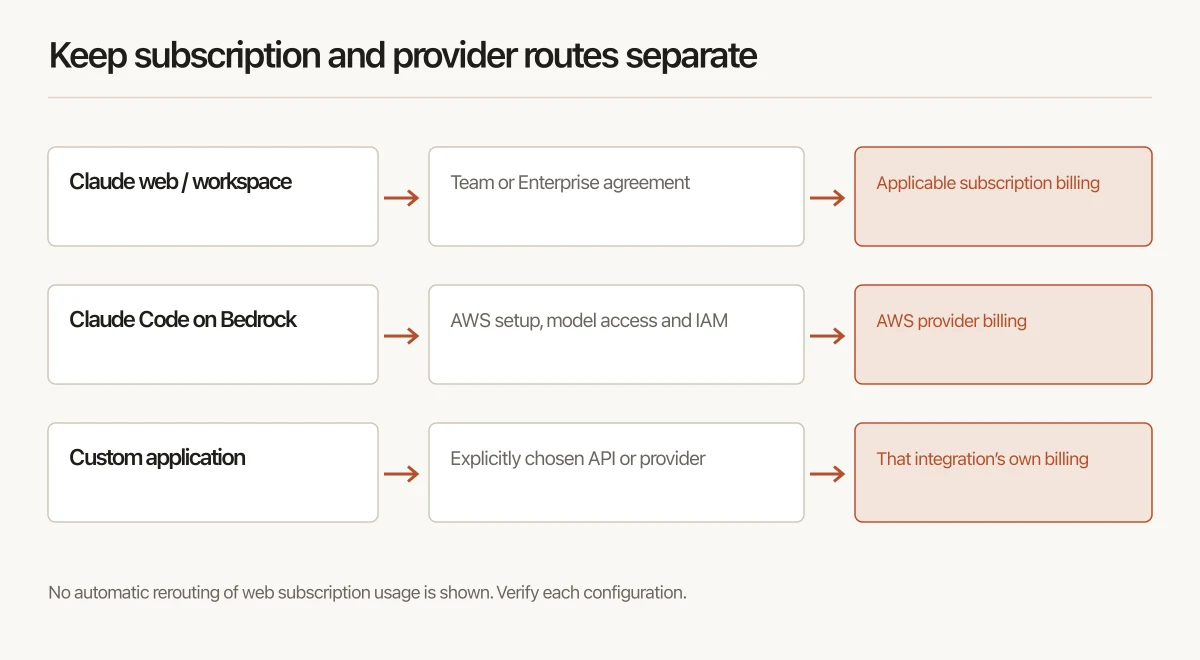
Claude on the web, Claude Code and a custom API application are different surfaces. Buying a Team or Enterprise seat does not automatically route its included web usage through AWS.
Anthropic documents how to configure Claude Code for Amazon Bedrock. That path requires an enabled AWS account, model access and appropriate permissions. It has its own provider setup and billing. A custom application also needs its own integration and access design.
If that route fits the workload, compare its model availability, regional processing, credentials, observability and actual contracted charges. Verify the specific environment and service rather than treating “in our AWS account” as proof of complete data isolation or compliance. Any partner discount or implementation offer needs its own terms; a plan comparison does not establish either.
For a rollout, record which developers use subscription login, which use a provider route and where each charge appears. Do not count the same usage twice or assume a discount negotiated for one route applies to another. For the provider-route cost model, see Claude on Bedrock token economics.
Use a small rollout to make the final decision
Before expanding access:
- Name the business, IT, security and billing owners.
- Choose the required controls and exact acceptance evidence.
- Confirm the current or proposed agreement and seat allocation.
- Configure identity, approved clients and tool connections for a small group.
- Run representative work and record limits, extra usage and review effort.
- Test removal of a pilot user and retain the result.
- Review the evidence, unresolved gaps and total cost before wider rollout.
If you are also changing coding tools, use the existing team migration assessment to separate portable configuration from work that needs rebuilding or testing. If you are evaluating Jarvis Crosswalk for help, confirm its current scope and deliverables with ASCENDING; this page does not promise an automated migration.
Keep Team when it meets the requirements. Choose an Enterprise offer when the additional controls or scale justify its complete cost. Evaluate a provider integration when that specific workload needs one. The plan name should follow the evidence you need—not replace it.
FAQ
Do we need Claude Enterprise for SSO?
No. The current Claude Team plan includes SSO. Review Enterprise when you need additional controls such as SCIM, audit records or custom retention, or your team exceeds the Team plan's published seat range. Match the exact requirement to current plan documentation and your agreement.
Does a Standard Team seat include Claude Code?
Yes. The current Team offer includes Claude Code with Standard and Premium seats. Premium provides more usage. Older Premium-only launch material is not the right basis for a new Team purchase; existing Enterprise seat types may have different terms.
How much is Claude Enterprise, and is there a minimum?
At the US list price checked October 29, 2026, the current Enterprise offer lists $20 per user per month billed annually, with usage billed separately. The current Enterprise help page lists a 20-seat self-serve minimum and a 50-seat sales-assisted minimum. Confirm your region, purchasing route and agreement before committing.
Does Enterprise always bill usage separately?
The current usage-based Enterprise offer does. Some existing or specialized organizations use different seat types and terms. Check the seat types shown in your organization, the applicable billing documentation and the renewal agreement instead of applying a new-plan calculation to every existing customer.
Can we redirect Claude Team's web usage through Amazon Bedrock?
Do not assume that. Claude Code can be configured to use Amazon Bedrock as a separate provider route with AWS credentials and permissions. Your own application can also integrate with a provider API. That is a separate configuration and billing decision, not automatic rerouting of a Claude web subscription or its included allowance.